

Coinbase Review
Published: 17 May 2026 Last updated: 21 May 2026
Price: Free to join (fees apply per transaction)
Pros
- Easy to use for first-time crypto buyers
- Strong fiat purchase options in supported regions
- Long-running, regulated exchange in major markets
Cons
- Fees can be higher than competing exchanges
- Not suited for active traders or futures users
- Account reviews and restrictions can frustrate users
What stood out when we checked Coinbase
Coinbase is beginner-friendly after verification, not before it.
The first screen you see after creating an account is a prompt to verify your identity. No buying, no depositing, nothing — until that clears. For a lot of first-time users, that wall is unexpected, and it is where the friction concentrates. The good news is that once verification passes, the experience changes considerably. The buy flow is straightforward, the charts are readable, and the app does what it says.
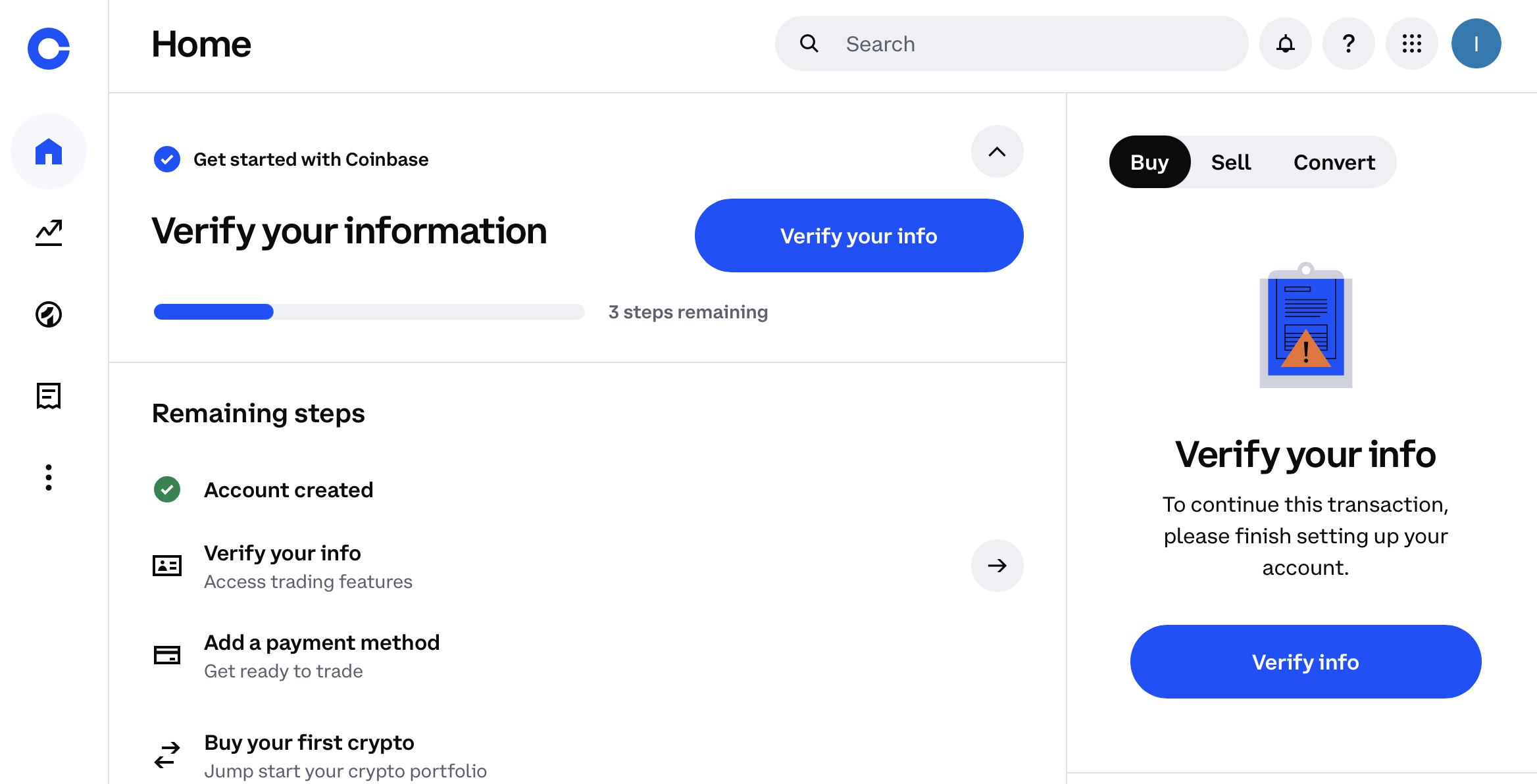
The home screen after account creation. Nothing is accessible until identity verification is complete — this is the wall most first-time users hit.
The biggest practical issue we found during our check: PNG files are rejected during ID upload. The error screen shows application/octet-stream as the file type — which is what happens when the system cannot read the file as a valid image. Converting to JPG fixed it immediately. If you get stuck on the verification step with no obvious reason why, that is the first thing to check.
My first registration on Coinbase
First-hand account — lightly edited for clarity only
"I struggled with verifying my identity for a long time. This was my first time signing up for a cryptocurrency platform like Coinbase. I use a MacBook and mostly work through Safari, where the pop-up blocker made the verification process more confusing. I think my ID card files were in .png format, but registration wouldn't work. I struggled for a long time until I reuploaded the photos in .jpg format, and then they verified right away with my selfie.
They also need to verify your address, which requires any bill or statement with your name and address listed. In my case, I sent them an electricity bill. Registration took less than 5 minutes after that, and now I can deposit funds into my Coinbase account using a credit card or debit card, as well as by bank transfer.
Since I'm new to this, it's pretty clear where to click and what to do. You can see in the screenshot that I clicked 'Buy Bitcoin,' entered 300 euros, and then went to 'Trade.' Everything is also easy and straightforward here. You can click any cryptocurrency and see a chart showing its daily, weekly, monthly, and yearly changes. I don't see any difficulty in this if you've ever seen charts and understand them a little.
There's also Advanced mode, which is a bit more complex, but if you just try it once, you'll understand the concept on all platforms."
Quick Facts
| Type | Centralised cryptocurrency exchange |
| Founded | 2012 |
| Headquarters | United States — publicly listed on Nasdaq (COIN) |
| Availability | US, UK, EU, Canada, Australia and more — check coinbase.com for your country |
| Assets listed | 250+ cryptocurrencies |
| Fiat support | Yes — payment methods and availability vary by region |
| KYC | Required for all account features |
| Trading fees | Spread plus transaction fee — varies by payment method, region and transaction size. Check the fee preview before confirming |
| Products | Spot buying/selling, earn, staking, Coinbase Advanced, Coinbase One subscription |
| Custody | Custodial — Coinbase holds private keys on your behalf |
| Regulation | Regulated in the US; compliant with requirements in other supported jurisdictions |
Verification, ID upload and address proof
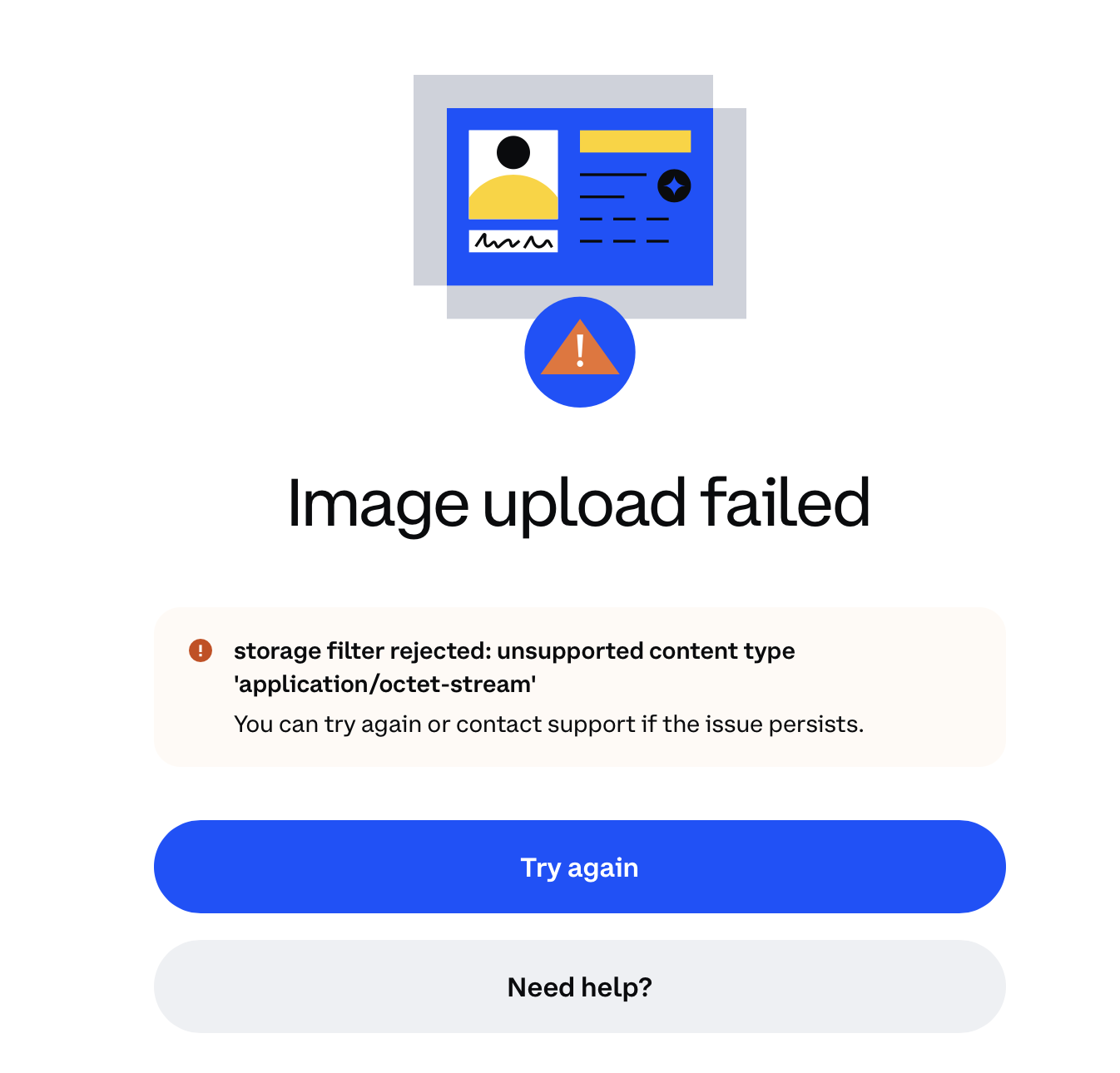
The error shown after uploading an ID document in PNG format. The "application/octet-stream" label means the system could not read the file as a valid image. Uploading the same document as JPG resolved it immediately.
Coinbase's identity verification follows the same general pattern as other regulated exchanges: photo ID, selfie, address proof. The steps themselves are not unusual — the friction comes from the file format issue.
PNG files can fail at the upload stage with a generic error that gives no obvious explanation. The technical reason is that some PNG exports carry a file type that Coinbase's upload system registers as application/octet-stream instead of a standard image MIME type. Switching the same document to JPG bypasses this. If your ID upload is failing with no explanation, that is the first thing to check — not the document itself.
Safari on Mac can add another layer of confusion. If Safari's pop-up blocker is active and the verification flow tries to open a new window or tab, the process stalls without a visible error. Look for the pop-up blocked indicator in the Safari address bar if the flow seems stuck.
After the ID upload, Coinbase requires a selfie to match the photo. This is biometric verification — standard for regulated exchanges and usually fast once the ID upload succeeds.
A separate step is address verification. Coinbase asks for a document showing your name and current address — a utility bill, bank statement or similar. An electricity bill worked in our check. This is a standard AML requirement for regulated exchanges and is worth having ready before you start the process.
Once all three steps pass, the account becomes fully functional. In our check, the total time after fixing the file format was under five minutes.
Buying Bitcoin on Coinbase
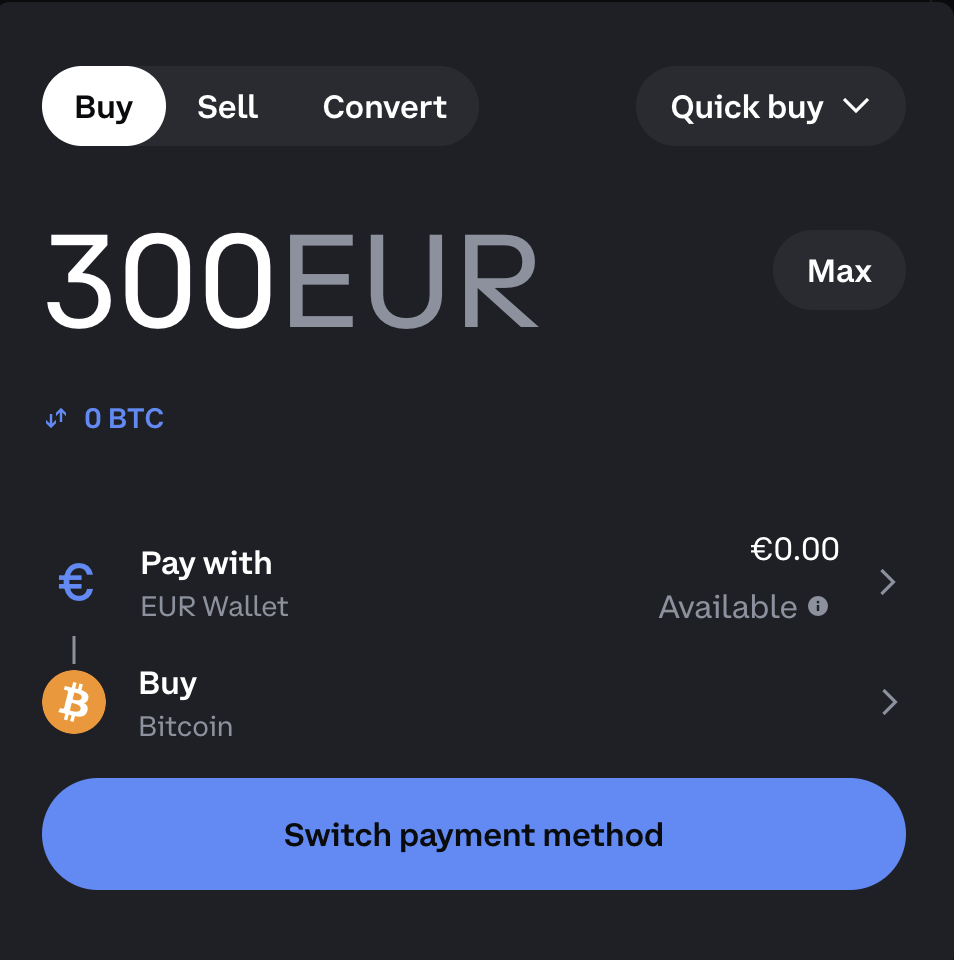
The Buy screen with 300 EUR entered for a Bitcoin purchase. The fee breakdown appears before you confirm — read it before clicking through, particularly if you're using a card rather than a bank transfer.
The buy flow is clean. You pick an asset from the list, enter the amount in fiat or crypto, and Coinbase shows what you will receive alongside a fee summary. The 300 EUR Bitcoin screen is representative: the layout is clear, the estimated BTC amount is visible, and the fee is shown before you commit.
The fee preview is the most important screen to read before confirming. Card purchases cost more than bank transfers — sometimes noticeably so. The exact amount changes based on method, region and transaction size, so there is no useful general figure. Look at the number on screen before you tap confirm.
On the 300 EUR Bitcoin buy screen, Coinbase showed the cost preview before confirmation. We did not complete the purchase, so we treat this as a preview check rather than a completed transaction.
Linking a card and payment methods
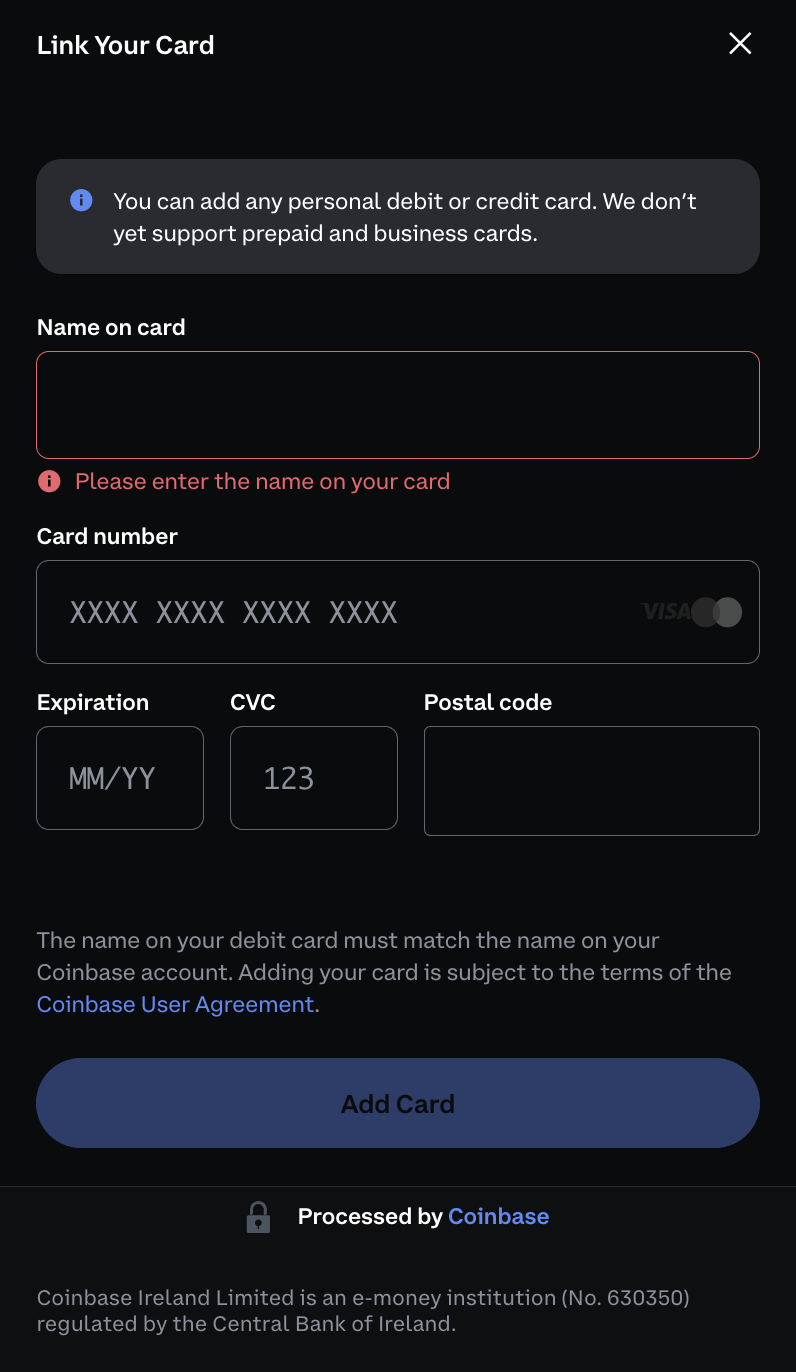
The payment method screen once verification is complete. Card and bank transfer routes both appear. Which options are available depends on your country.
Once verification clears, deposit options open. Credit card, debit card and bank transfer all appeared in our check. These options appeared during our check, but Coinbase payment methods can vary by country, verification status and account history.
Bank transfer is the cheaper route. Card is faster but adds to the fee. If you are not in a hurry, bank transfer is usually the better option for cost.
Our check was done from an EU user perspective. After verification, Coinbase showed EUR-based buying and payment options, including card and bank-transfer routes. Availability, fees and verification requirements can still vary by country, account status and payment method, so EU users should check the final payment screen before depositing.
Trade and charts for beginners
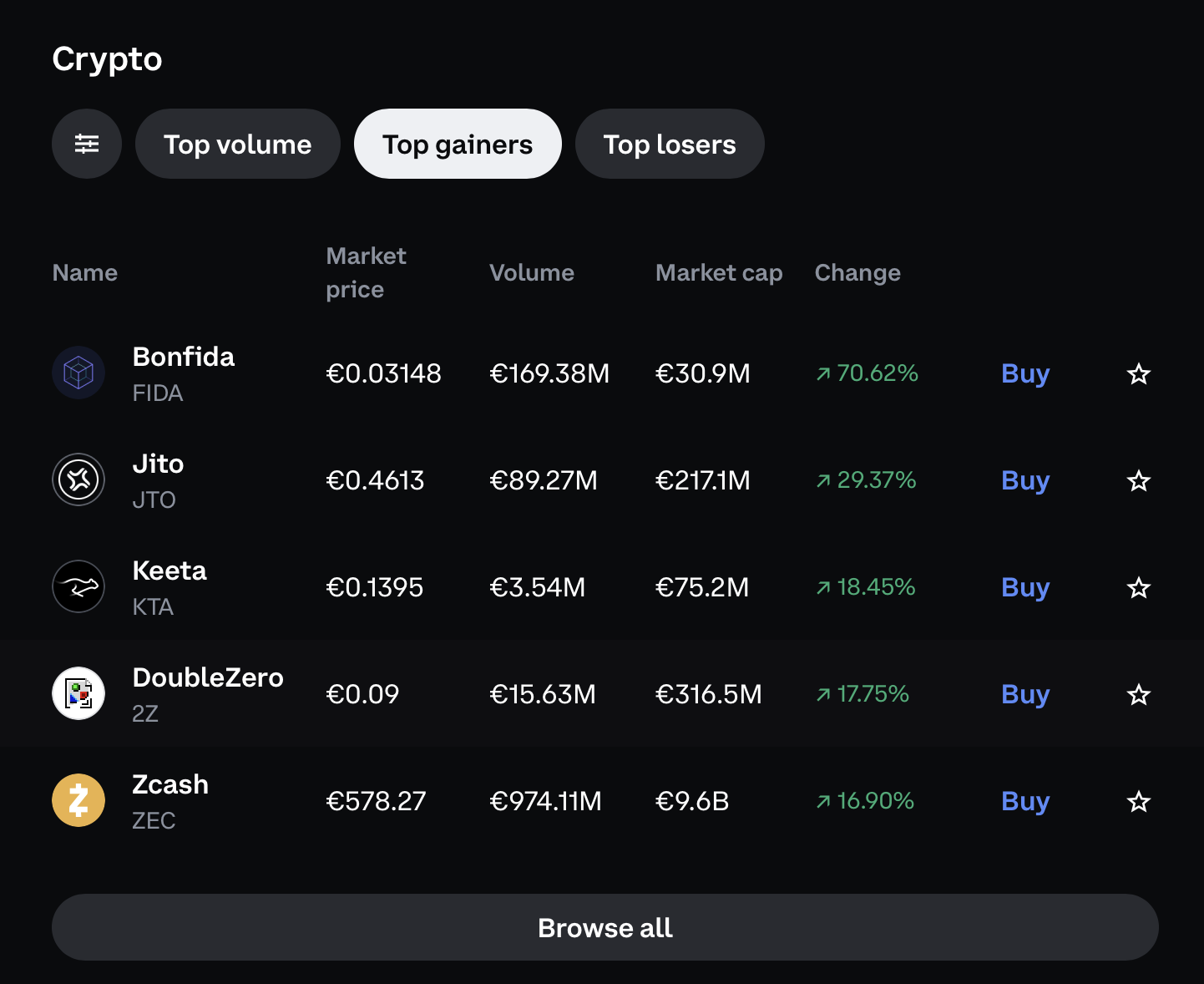
The Trade screen lets beginners open a coin chart and switch between time ranges before moving into the more complex Advanced interface.
The Trade section in Coinbase gives you a basic price chart for any listed asset — daily, weekly, monthly and yearly views. For someone who has looked at a price chart before, it reads immediately. For a first-time crypto buyer who has no chart experience, it still works: the direction of the line is clear, and Coinbase does not require you to understand candlesticks or indicators to use it.
Tapping any asset in the Trade section opens the chart view with a Buy or Sell button below. The chart is there to give context on price movement over time, not to execute analysis. For a first purchase, that is usually enough.
Coinbase Advanced mode
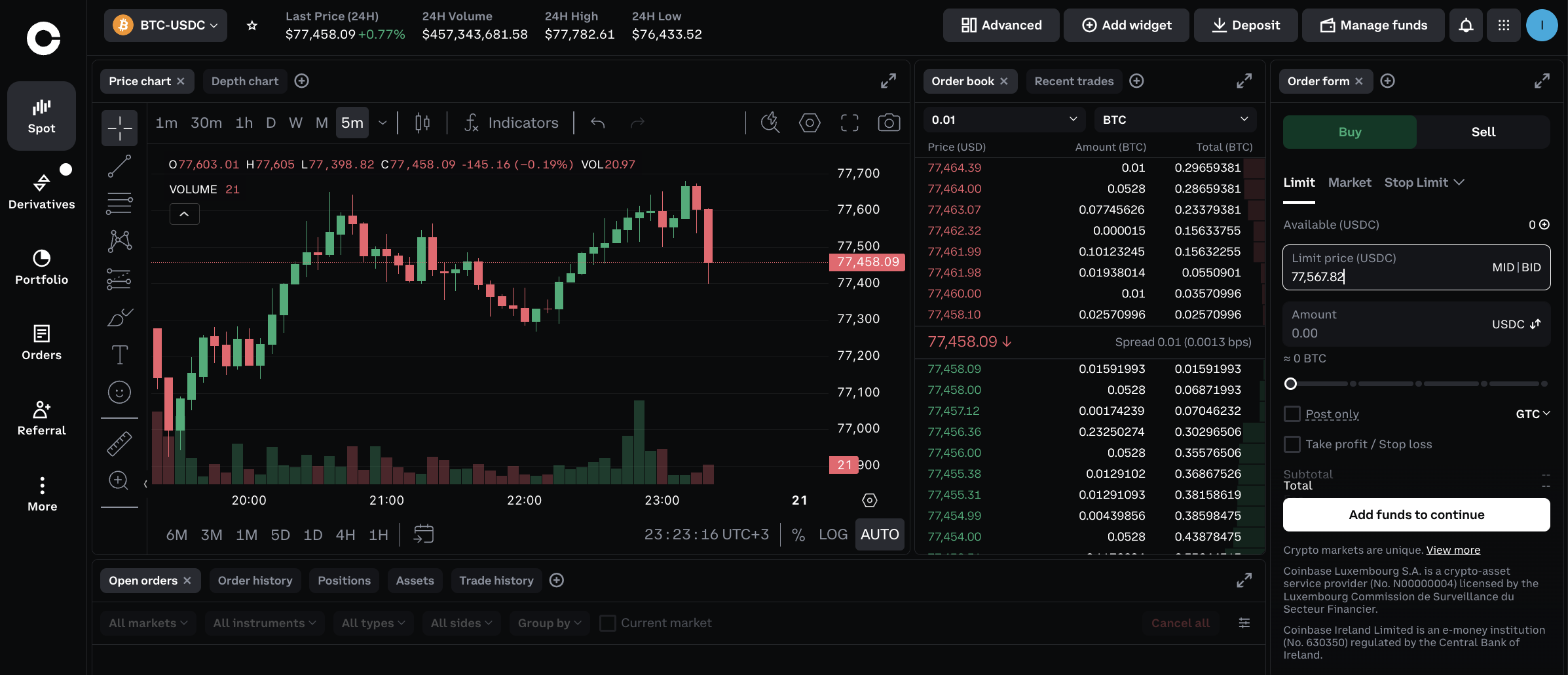
Coinbase Advanced — the BTC/EUR spot view. Order book, depth chart and price action are all visible. A different experience from the simple buy interface, but the layout is familiar if you have used any exchange before.
Coinbase Advanced (also called Coinbase Advanced Trade) is a separate trading interface within the same account. It shows the order book, depth chart, price chart and order entry — limit orders, market orders and a tighter layout than the simple buy screen.
It is more involved than the basic flow, but if you have used any trading interface on any platform before, the concept carries over directly. The BTC/EUR spot screen shown above is a reasonable representation of what to expect.
Advanced mode typically has a different fee structure from the simple buy interface — generally with tighter spreads for higher volumes. If you plan to trade regularly rather than buy and hold occasionally, comparing the Advanced Trade fee schedule against other platforms is worth doing before settling on Coinbase as your main exchange.
Staking and earn
Coinbase may show staking or earn options for selected assets, but availability, rates and lock-up terms can vary by region and asset. We did not test staking in this review. If you use staking through a centralised exchange, the platform controls the staking flow and the asset remains subject to exchange custody risk.
Coinbase fees and Coinbase One caveat
The simple buy interface charges a spread plus a transaction fee. Both vary by payment method, transaction size and region. There is no single flat fee to quote here — the number on the fee preview screen before you confirm is the only reliable figure. Read it.
Card purchases cost more than bank transfers. For larger amounts or frequent purchases, that difference adds up.
Coinbase showed a fee preview before confirmation on the 300 EUR Bitcoin buy screen. We did not complete the purchase, and fees can change by country, payment method, spread and market timing. For that reason, we would compare the final BTC amount and total cost on the preview screen before paying, rather than relying on a fixed percentage.
Coinbase One is a subscription option that Coinbase advertises as offering reduced or zero-fee trading. We saw a referral screen for it inside the app during our check — personal referral details are redacted in the screenshot below. We did not subscribe or test Coinbase One, so we cannot confirm the current terms, pricing or which regions it is available in. If this is relevant to your decision, check the current terms directly on the Coinbase site.
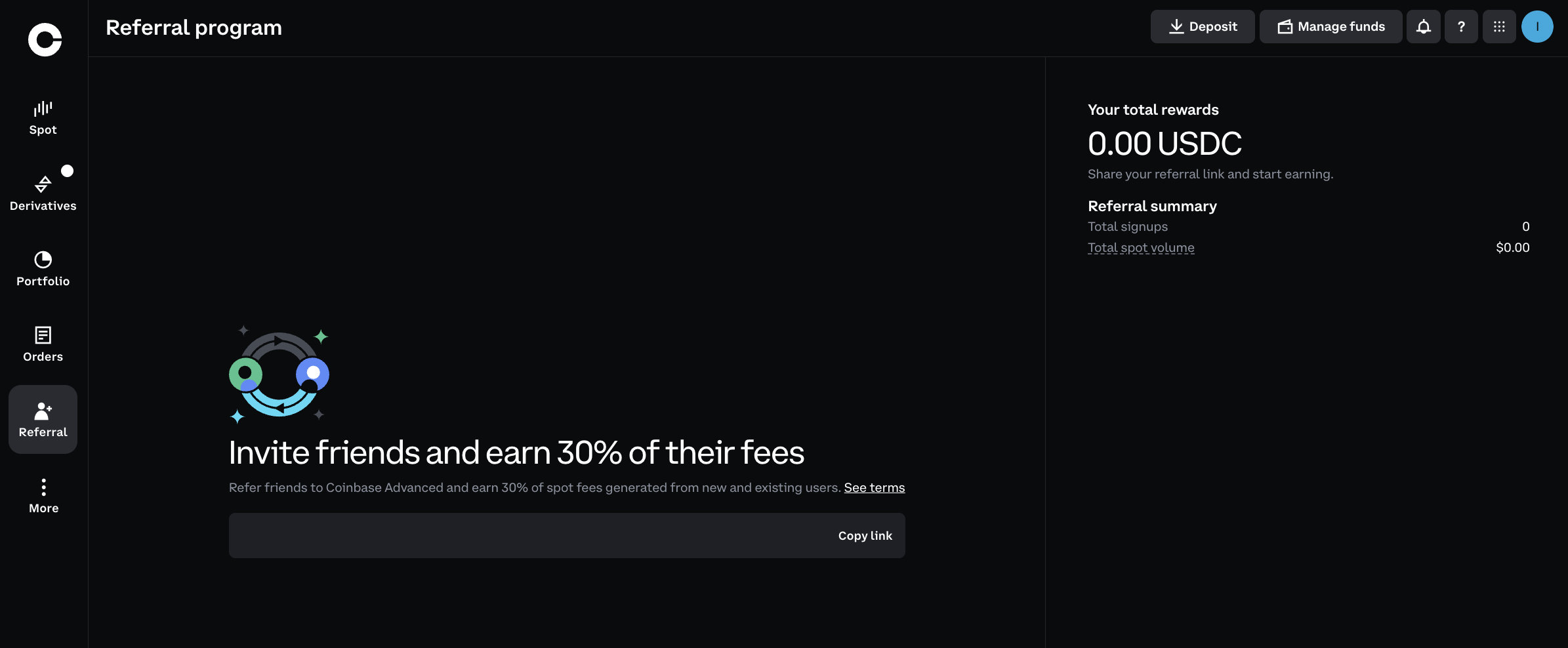
The Coinbase referral screen observed inside the app — personal referral details redacted. Referral and Coinbase One terms, eligibility and availability depend on your country and account status.
Coinbase
Coinbase — Check Current Offers
Coinbase has run signup offers, learning rewards and promotional campaigns. Eligibility and availability vary by country and can change. Check the current terms on the official site before signing up based on a specific promotion.
Offer terms can change. Check the current details on the official site before using the code.
Coinbase custody risk
Coinbase holds your private keys. That is the standard model for custodial exchanges — Coinbase is not unusual here, but it is worth understanding what that means before you deposit.
- Your crypto is accessible through your Coinbase account login, not a private key you hold yourself
- If your account is restricted, frozen or under compliance review, access to your funds is affected
- If Coinbase faces a serious security incident or regulatory action, your holdings are exposed
- Account freezes can happen with limited explanation, particularly during compliance reviews
Coinbase is one of the better-regulated options in this space and holds most user funds in cold storage. That reduces risk, but it does not eliminate custody risk. For crypto you plan to hold for any significant period, withdrawing to a self-custody hardware wallet is the standard approach for a reason. See our best hardware wallets guide, wallet overview, or common crypto wallet mistakes for the full picture on custody errors.
Coinbase Exchange vs Coinbase Wallet
These are two different products. Beginners mix them up often, and the consequences of getting it wrong are real. If you are not sure what a crypto wallet is before reading this, see our intro guide or our crypto exchange vs wallet guide.
- Coinbase (the exchange app) — custodial; Coinbase holds your crypto; KYC required; designed for buying, selling and holding
- Coinbase Wallet (separate app) — self-custody; you control your private keys; not connected to your exchange account unless you explicitly move funds between them
If you install the main Coinbase app and buy crypto, that crypto sits in Coinbase's custody — not in your own wallet. To hold your own keys, you need to send your crypto to a self-custody wallet after purchase. See our Coinbase Wallet review for the full breakdown of the self-custody side, and our seed phrase safety guide before setting up any self-custody wallet.
Coinbase alternatives
| Coinbase | Kraken | Bybit | OKX | |
|---|---|---|---|---|
| Available in US | ✓ Yes | ✓ Yes | ✗ No | ✗ No |
| Beginner-friendly | ✓ High | ✓ Good | Moderate | Moderate |
| Fiat deposits | ✓ Yes | ✓ Wide support | Regional | Regional |
| Derivatives / futures | ✗ Limited | Limited | ✓ Yes | ✓ Yes |
| Copy trading | ✗ No | ✗ No | ✓ Yes | ✓ Yes |
| Fees (simple buy) | Higher | Lower | Lower | Lower |
| Regulation | US-regulated | US-regulated | Dubai | Cayman Islands |
| Best for | Beginners, US users | US/EU, lower fees | Active trading | Web3 + active trading |
Coinbase vs Kraken: Both regulated and US-accessible. Kraken tends to be cheaper on fees and has a more detailed interface. If fees matter and you are comfortable with slightly more complexity, Kraken is worth comparing directly. See our Kraken review.
Coinbase vs Bybit: Bybit does not serve US users and is built for derivatives and copy trading. Different product category — not a like-for-like comparison. See our Bybit review.
Coinbase vs OKX: OKX is not available to US users and has a broader Web3 feature set. For spot buying with fiat, Coinbase is more appropriate for most first-time buyers. See our OKX review.
Coinbase vs Bitget: Bitget's focus is copy trading and futures — a different use case from Coinbase's buy-and-hold simplicity. See our Bitget review.
Before you use Coinbase
- Check that Coinbase is available in your country before signing up
- Check which payment methods are accessible in your region — bank transfer and card availability varies
- If you are uploading ID documents, use JPG not PNG — PNG uploads can fail with a file-type error
- If you are on Safari and the verification flow seems stuck, check whether Safari is blocking a pop-up in the address bar
- Have an address proof document ready — electricity bill, bank statement or similar with your name and address
- Read the fee summary before confirming any transaction, particularly card purchases
- Coinbase holds your crypto — it does not sit in your own wallet unless you move it to self-custody
- If you plan to hold long-term, move your crypto to a hardware wallet after purchase
- Coinbase One and any promotional offers have their own eligibility rules — check current terms on the Coinbase site
Real user complaints we check
We look at patterns in user feedback from Trustpilot, Reddit, and app store reviews. The most common complaints about Coinbase:
- High fees or spread — the most common complaint, particularly from users who compared costs with other platforms after the fact
- KYC or account verification delays — some users report extended waits, especially when documents need manual review
- Account restrictions — accounts can be flagged or temporarily restricted during compliance reviews with limited explanation
- Withdrawal delays — particularly for bank withdrawals in certain regions or accounts under review
- Customer support response times — complex issues can take several days; live support is not always available
- Country and payment method limitations — users in some regions find deposit options are more limited than expected
- Coinbase vs Coinbase Wallet confusion — users who thought their crypto was in their own wallet when it was held by Coinbase, or vice versa
The fee-related complaints are the most avoidable. Checking the fee preview before every transaction makes a material difference.
Frequently Asked Questions
Is Coinbase safe?
Coinbase is one of the longest-running regulated crypto exchanges and is publicly listed in the US. It holds most user funds in cold storage and publishes security information publicly. That said, every centralised exchange carries custody risk — Coinbase holds your private keys, not you. For larger amounts you plan to hold long-term, moving to a self-custody hardware wallet is the safer approach.
Does Coinbase require KYC?
Yes. Coinbase requires identity verification for all account features, including buying, selling and withdrawing. You will need a government-issued photo ID and personal information. If you upload ID documents, use JPG rather than PNG — PNG uploads can trigger a file-type error that blocks verification.
Is Coinbase good for beginners?
Yes, once you get through verification. The buy interface is clean and the steps are clear. The trade-off is that the simpler interface generally comes with higher fees than advanced platforms — always check the fee preview before confirming.
What are Coinbase fees?
Coinbase fees vary depending on payment method, transaction size, region and product. The simple buy/sell interface includes a spread plus a transaction fee. Card purchases cost more than bank transfers. Check the fee preview shown before you confirm — the actual cost is sometimes higher than a flat percentage suggests.
Is Coinbase available in my country?
Coinbase is available in many countries, including the US, UK, EU member states, Canada, Australia and others. Availability and which payment methods are supported vary by region. Check the official Coinbase site for the current list before signing up.
Does Coinbase work for EU users?
Our check was done from an EU user perspective. After verification, Coinbase showed EUR-based buying and payment options, including card and bank-transfer routes. Availability, fees and verification requirements can still vary by country, account status and payment method, so EU users should check the final payment screen before depositing.
What is the difference between Coinbase and Coinbase Wallet?
Coinbase exchange (the main app) is a custodial platform — Coinbase holds your crypto on your behalf. Coinbase Wallet is a separate, self-custody wallet app where you control your own private keys. They share branding but are different products. Crypto in your Coinbase exchange account is not in your own wallet unless you move it deliberately.
Is Coinbase cheaper than Kraken?
For most transactions, Kraken tends to have lower fees than Coinbase's standard buy interface. Coinbase's simple flow includes a spread plus a fee, which adds up for regular purchases. Fee-sensitive users should compare both before committing.
What should I check before depositing on Coinbase?
Confirm Coinbase is available in your country, check which payment methods are supported in your region, review the fee preview for your intended transaction before confirming, and understand that Coinbase holds your crypto unless you move it to a self-custody wallet. If you plan to hold long-term, consider withdrawing to a hardware wallet after purchase.
Why does my ID upload fail on Coinbase?
PNG files can trigger a file-type error during Coinbase identity verification — the error typically shows "application/octet-stream" as the file type. Reuploading the same ID document as a JPG usually resolves it. Safari on Mac can also block pop-ups that are part of the verification flow — check for a blocked pop-up in the address bar if the process seems stuck.
Related pages
- Best Crypto Exchanges 2026 — Full Comparison
- All Crypto Reviews
- Kraken Review — Regulated Alternative with Lower Fees
- Bybit Review — For Active Traders Outside the US
- OKX Review — Web3 Wallet and Broad Asset Selection
- Bitget Review — Copy Trading Focus
- Coinbase Wallet Review — Self-Custody Option
- Best Hardware Wallets — Store Your Crypto Safely
Ready to explore Coinbase? Use the official route and review the current terms before signing up.
Visit SiteHow We Evaluate Crypto Exchanges
We assess exchanges on fees and fee transparency, KYC requirements and country availability, withdrawal reliability, security practices and custody model, supported assets and trading pairs, fiat on/off-ramp access, bonus and reward campaign terms, beginner usability, and patterns in real user complaints. We do not factor in whether a platform has an affiliate arrangement with us — exchanges are assessed on the same criteria regardless of commercial relationship.